
Why YouTube Stopped Recommending Your Videos - Real Causes and How to Fix It
YouTube stopped pushing your videos? Learn the 10 real reasons videos lose recommendations and the exact recovery steps used by successful Indian creators.
Utkarsh Agrawal
6/28/202612 min read
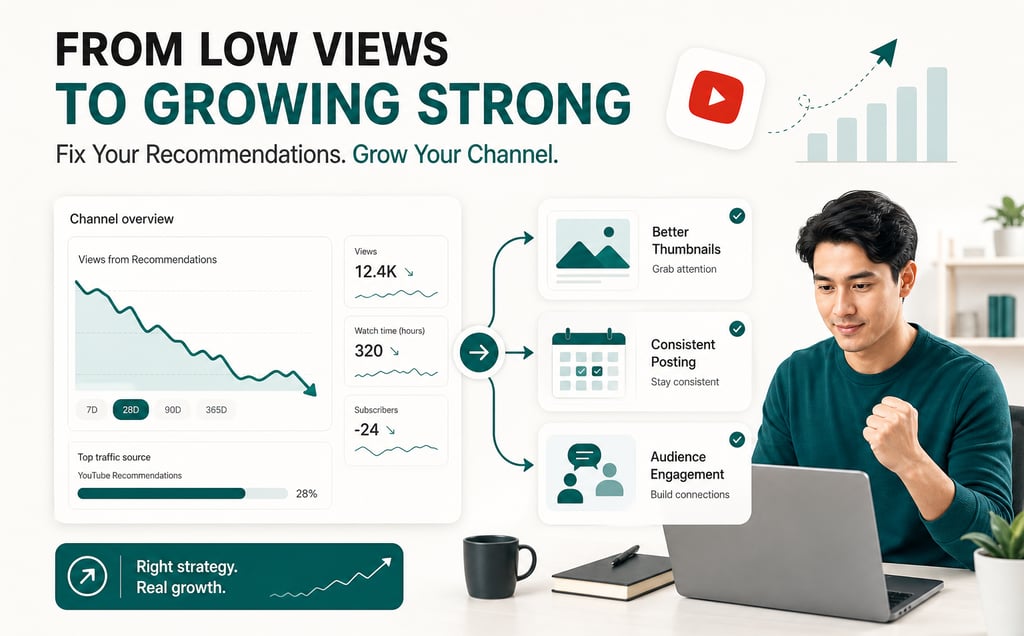
Before we fix what's broken, you need to understand how YouTube's recommendation system decides whether to promote your video or bury it.
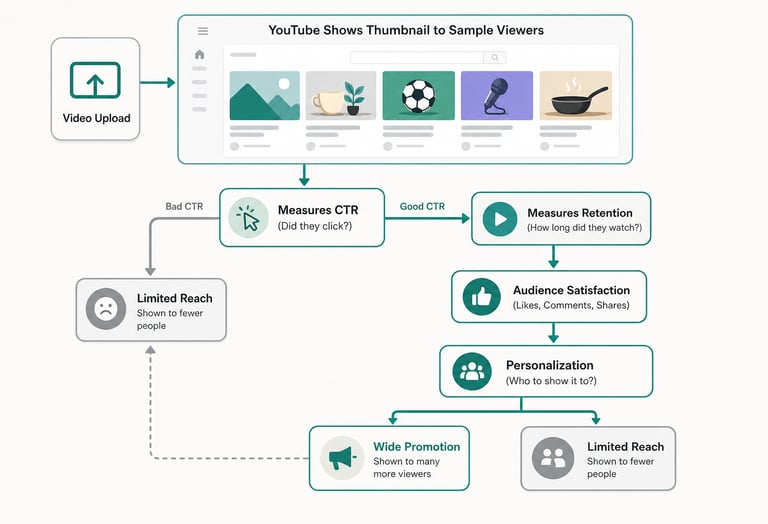
YouTube has three main recommendation surfaces: Browse (the homepage feed each viewer sees), Suggested (the next-video recommendations on the sidebar), and Search (when creators explicitly look for your content type). Most of your reach comes from Browse and Suggested-these are where YouTube's algorithm makes the call about who gets shown what.
Here's how it works:
Impressions are the first gate. When you upload, YouTube shows your thumbnail and title to a small sample of your subscribers and similar viewers. This test run lasts 24–48 hours. YouTube tracks one thing obsessively: did people click on your video? That metric is your click-through rate (CTR), and it's the loudest signal YouTube hears.
If your CTR is strong (usually 4–8% or higher for most niches, higher for smaller channels), YouTube escalates your video to a wider audience. If it's weak (below 2–3%), YouTube stops promoting it-even to your own subscribers.
But CTR is just the entry fee. Once people click, YouTube then watches what they do. This is viewer retention-how long they actually watch. Read our guide on impressions vs views here. If viewers click your thumbnail but leave after 10 seconds, YouTube sees that as a signal that your content isn't delivering on the promise of your title. It then throttles your recommendations, because promoting a video that doesn't hold viewers damages YouTube's own experience.
Audience satisfaction signals matter even more than raw watch time. These include:
Likes, dislikes (which YouTube weighs heavily even though they're hidden from public view)
Comments and engagement rates (viewers willing to comment are more satisfied)
How often viewers watch your full video vs. skip to the end
Whether they watch multiple videos from you in a session
Click-away rate (did they immediately bounce to another creator?)
Finally, there's the personalization layer. YouTube's algorithm learns who your typical viewer is and prioritizes showing your video to people like them. A tech channel that's built an audience of 25–35-year-old software engineers gets recommended to similar people, not to 18-year-olds watching dance covers. This is why topic consistency matters-when you jump niches, your audience profile fractures, and YouTube's personalization engine doesn't know who to promote you to anymore.
The whole system runs on a simple feedback loop: Show video → Measure CTR + retention + satisfaction → Promote or restrict accordingly.
10 Real Reasons Videos Stop Getting Recommended
Your videos stopped getting recommendations for one of these reasons (usually it's a combination):
Checklist of 10 reasons YouTube videos stop getting recommended: Low CTR, Poor Retention, Weak Engagement, Inconsistent Posting, Topic Shift, Guidelines Violations, Lost Audience, Bad Thumbnails, New Competition, and Low Channel Age
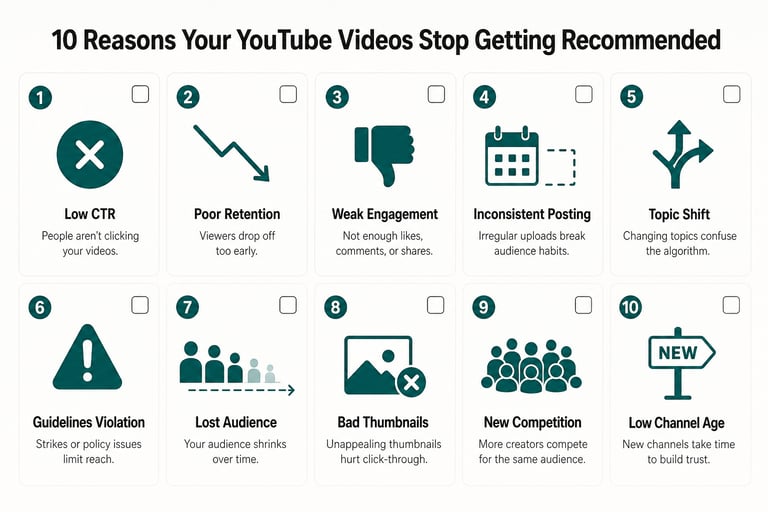
1. Low Click-Through Rate (CTR)
This is the #1 reason videos lose recommendations.
When YouTube shows your thumbnail to potential viewers, a certain percentage click on it. If that percentage is too low, YouTube stops bothering to promote it. For most creators, a healthy CTR is 4–8%. Below 2–3% is a red flag.
Common causes:
Boring or vague thumbnail - no contrast, unclear what the video is about, blend in with other videos in suggested
Misleading title - viewers click expecting one thing, get another, then leave immediately (YouTube penalizes this)
Clickbait that oversells - "I GREW MY CHANNEL BY 50K SUBS IN ONE WEEK!" (You didn't, not fairly, and viewers know it)
Poor timing - uploading when your audience is asleep (critical for Indian creators in different time zones from your audience)
Indian creator scenario: You post a Hindi tutorial on "Channel Growth Secrets" with a generic thumbnail. Your CTR is 1.8%. YouTube shows it to 500 people; only 9 click. YouTube stops showing it entirely.
2. Poor Viewer Retention
Even if people click your video, they have to stay to signal that your content works.
YouTube measures average view duration (AVD) and completion rate-what percentage of viewers watch your full video vs. drop off at 20%, 50%, or 80%. Videos with strong early retention (people staying past the first 30 seconds) get a massive boost; videos with weak early retention get throttled.
Common causes:
Slow intro - you spend 20 seconds on "Hey everyone, welcome to my channel…" while viewers want the value immediately
Poor pacing - long pauses, repetitive explanations, filler content
Bad hook - first 5 seconds don't make clear why watching matters
Misleading hook - you promise one thing in the intro, deliver another 2 minutes in
Indian creator scenario: Your "YouTube Monetization Tips" video takes 45 seconds to even say what you're teaching. Viewers drop at the 15-second mark. YouTube's data shows 35% average view duration. Recommendations stop immediately.
3. Audience Satisfaction Signals
YouTube watches whether people actually like and engage with your video, not just watch it.
This includes:
Like-to-view ratio (what % of viewers bother to like?)
Comment rate (engaged viewers comment; passive viewers don't)
Share rate (if people share your video, they're satisfied)
Watch-again rate (do people come back for your next video?)
A video with 1000 views and 2 likes signals very different satisfaction than a video with 1000 views and 80 likes.
Common causes:
Weak call-to-action - you never ask viewers to like or comment
No community interaction - you ignore comments or never reply
Low value delivery - content feels clickbait-y or surface-level
Mismatch between thumbnail promise and content delivery
Indian creator scenario: You get 5,000 views but only 20 likes and 5 comments. Your engagement rate is 0.5% (very low). YouTube sees your audience isn't satisfied and stops promoting.
4. Posting Inconsistency
YouTube's algorithm favors consistency. Channels that upload reliably (weekly, bi-weekly, whatever the pattern) build recommendation momentum. Channels that upload sporadically get deprioritized.
Common causes:
Long gaps between uploads (2+ weeks)
Irregular schedule (upload Monday, then disappear for a month, then post Friday)
Life happened - you took a break for work, family, or burnout
Even a single 3-week gap can trigger a recommendation slowdown that takes weeks to recover from.
Indian creator scenario: You upload consistently for 3 months, building to 8k subs and solid recommendations. Then you get busy with exams/work and don't upload for 6 weeks. When you come back, your video gets 200 views in the first week (compared to 1500 for your pre-break videos). You've lost algorithm momentum.
5. Topic or Format Shifts
When you suddenly change what your channel is about, your audience profile fractures and YouTube's personalization engine breaks.
Common causes:
Pivot from one niche to another (you were a cooking channel, now you're doing tech reviews)
Sudden format change (you were doing 20-minute deep dives, now you're doing 60-second shorts)
Language shift (you were posting in Hindi, suddenly switch to English, or vice versa)
Upload to a completely different playlist category (mixing gaming, finance, and vlogging on one channel)
YouTube's algorithm is built around consistency. When it breaks, recommendations suffer.
Indian creator scenario: You built a 15k-subscriber Hindi gaming channel. Then you suddenly pivot to English tech tutorials because you think it'll be more profitable. Your new audience (English speakers interested in tech) overlaps almost zero with your old audience (Hindi-speaking gamers). YouTube's recommendation system has no idea who to show your new videos to. Recommendations crater.
6. Community Guidelines or Copyright Violations
If YouTube flags your content for guideline violations or copyright strikes, it automatically de-ranks from recommendations.
Common causes:
Copyright strikes - using copyrighted music, footage, or images without permission
Guideline violations - flagged (even without a strike) for potentially hateful, misleading, or harmful content
Spam or artificial engagement - buying views, likes, or subscribers
Repeated removal notices - even if not full strikes
Once flagged, recovery is slow. You might need to appeal, wait for review, and then re-earn algorithm favor.
Indian creator scenario: You use a trending Bollywood song in your thumbnail but don't have rights. Copyright strike. Your channel loses recommendations for 3 weeks while you appeal.
7. Audience Retention has Declined
Sometimes your videos used to get recommendations, but they stopped even though you didn't change anything.
Common causes:
New competition in your niche - creators with better hooks, pacing, or production started uploading
Your audience aged out - followers who used to watch you now ignore your videos
Algorithm update - YouTube changed how it weighs retention vs. CTR
Subtle quality drop - your recent videos are slightly worse than your older ones (audio, lighting, pacing)
8. Thumbnail or Title Changes That Hurt CTR
Sometimes a small change tanks your CTR:
Changed to a cleaner, minimalist thumbnail (lost contrast)
Started using longer, more descriptive titles (people want immediate clarity)
Changed your thumbnail style midway through the channel's history
Removed faces, emotions, or visual hooks that used to work
9. New Competition and Niche Saturation
If ten new creators started posting in your exact niche with better production, YouTube might deprioritize you because you're not the best option for that viewer anymore.
This is especially true in niches like:
YouTube growth tutorials (oversaturated, thousands of channels doing this)
Finance and stock tips (fierce competition)
Cooking and recipes (saturated regionally, especially in India)
10. Channel Age and New Channel Disadvantage
Newer channels have a tougher time getting recommendations initially. YouTube gives new videos a wider sample test (showing to more viewers initially), but if CTR or retention is weak, it cuts off faster.
Channels under 50k subs also face a "smaller recommendation pool" issue: YouTube has fewer total viewers in your category available to recommend you to, so your performance has to be exceptional.
How to Diagnose Which Reason Applies to Your Channel
Don't just guess. YouTube Studio gives you the data to pinpoint exactly what's wrong.
Open YouTube Studio → Analytics → Overview. You're looking for the "impressions" graph over the last 4 weeks.
Step 1: Check if impressions are down.
If your impressions count dropped by 30%+ in the last 2 weeks, you have a recommendation problem. Impressions = how many times YouTube showed your videos to viewers. Lower impressions = YouTube stopped promoting you.
Step 2: Cross-reference with click-through rate (CTR).
Go to Analytics → Reach → Click-through rate.
If CTR is under 2%, your thumbnails/titles aren't compelling enough.
If CTR is 4–8% (good) but impressions are still down, your problem isn't CTR.
Step 3: Check average view duration (AVD) and audience retention.
Go to Analytics → Engagement → Average view duration and look at the graph for individual videos.
If AVD dropped below 2 minutes on 10-minute videos, retention is your issue.
If it stayed the same but impressions dropped, retention isn't the culprit.
Step 4: Audit your last 5 uploads.
For each of your last 5 videos, check:
Views in first 24 hours (should be consistent or growing; if it dropped 50%, something changed)
Like ratio (divide likes by views; should be 1–3%)
Comment ratio (divide comments by views; should be 0.5–2%)
Did you post on your usual schedule? (if you skipped a week, that explains it)
Did you change thumbnail style, title format, or content topic?
Step 5: Use the "Traffic source" report.
Go to Analytics → Reach → Traffic source detail.
Look at the pie chart:
YouTube search (how many views came from search)
Suggested videos (how many from recommendations)
Browse features (how many from YouTube homepage)
Subscriptions (how many from subscribers)
If "suggested" and "browse" dropped significantly while "subscriptions" stayed the same, YouTube stopped recommending you but your subscribers still watch. This points to one of the algorithm-based issues above (low CTR, retention, engagement, posting consistency, or topic shift).
If subscriptions dropped too, you have an engagement problem-even your loyal audience is losing interest.
Your Recovery Plan: Step-by-Step
Recovery takes 2–6 weeks if you execute consistently. Here's exactly what to do:
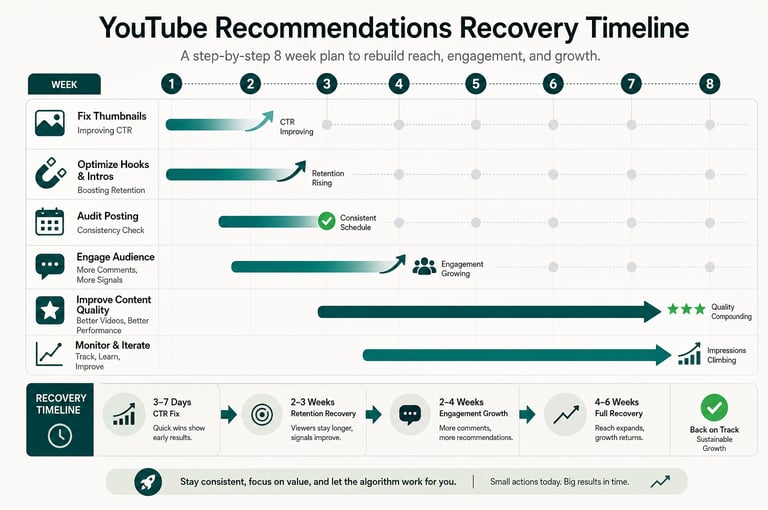
Week 1: Fix Your Thumbnails
Thumbnails are the fastest-impact fix.
Identify your 3 videos with the lowest CTR (Check YouTube Studio → Analytics → Reach).
Screenshot them and compare to top creators in your niche - what's different? Do they use more contrast, bright colors, bigger text, faces with emotion?
Create new thumbnails (re-upload without changing the video itself-YouTube allows custom thumbnails on most accounts).
New thumbnail best practices for Indian creators:
Use bold, high-contrast colors (the teal-and-gold combo works for many Indian niches)
Include a face or emotion if relevant (eye contact, shocked/happy expressions)
Add text only if it's one word and huge
Avoid full sentences
Leave 10% margin on edges (YouTube rounds thumbnails, cutting off edges)
Within 3–5 days, you'll see if new thumbnails improve CTR. If CTR jumps from 2% to 5%, you've found your problem.
Week 1–2: Optimize Your Hooks and Intros
While waiting for thumbnail data:
Watch the first 30 seconds of your last 10 videos.
Time how long until you state what the video is about. It should be under 5 seconds.
Re-upload or add a pinned comment with the hook (describe the immediate value: "By 2:15, you'll know exactly why YouTube stopped recommending your videos").
Reduce intro length: If you do an intro, keep it to 3 seconds max.
Week 2–3: Audit Posting Consistency
Check your upload history (YouTube Studio → Channel → Details → Uploads).
Identify any gaps longer than 2 weeks.
Commit to a posting schedule for the next 8 weeks (weekly, bi-weekly, whatever you can sustain).
Pre-plan and batch-record content now so you don't miss a deadline.
Consistency beats quality here-a decent video uploaded on time beats a perfect video posted 3 weeks late.
Week 2–4: Engage Your Audience
Reply to every comment on your videos (algorithm boosts videos with creator-community interaction).
Pin one high-engagement comment from each new upload (encourages more comments).
Add a call-to-action in your videos: "If this helped you, drop a comment below-what's your biggest YouTube challenge?"
Cross-link internally: In each video, mention 2–3 related videos you've made (this helps viewers watch multiple videos in one session, signaling satisfaction to YouTube).
Week 3–8: Improve Content Quality
Re-watch your highest-retention videos. What made them work? (Pacing, topic, format, length?)
Apply those patterns to your next 4–5 uploads.
Audit your 15-minute videos. Can you tighten them to 10? Shorter videos with strong pacing often outrank longer, slower ones.
Test a new format or angle in your niche. If you always do tutorials, try a "myths vs facts" video or "creator interview." Variation can resurface your channel in recommendation algorithms.
Weeks 4–8: Monitor and Iterate
Track these metrics weekly in a spreadsheet:
Views per video (should stay consistent or grow)
CTR (should stabilize at 4%+)
Average view duration (should remain above 2 minutes per 10-minute video)
Likes and comments
Impressions (should tick upward after 2–3 weeks)
If metrics improve but impressions still haven't recovered, you might have a topic/niche issue-consider creating 2–3 videos in a sub-niche that's getting more audience interest.
For Hindi-Language Creators and Regional Content
If you're posting in Hindi, Marathi, Tamil, Kannada, or another Indian language:
Optimize metadata in your language only (don't mix Hindi and English-confuses the algorithm)
Research trending formats in your language (TikTok/Reels trends in Hindi often predict YouTube trends in Hindi)
Build audience interaction in your native language (reply to comments in Hindi, not English)
Post at times when your language audience is active (peak hours for Hindi creators are usually 6–9 PM IST and 12–1 PM IST)
How Long Recovery Takes
This depends on what broke:
Low CTR fix: 3–7 days (new thumbnails, immediate impact)
Retention issues: 2–3 weeks (need multiple videos of data showing improvement)
Engagement/satisfaction: 2–4 weeks (YouTube needs to see sustained likes/comments)
Posting consistency recovery: 3–4 weeks (algorithm rebuilds trust after consistent uploads)
Topic shift recovery: 4–8 weeks (personalization engine needs time to learn your new audience)
Copyright/guideline strikes: 2–4 weeks after appeal (depends on YouTube's review speed)
Most creators see their first recommendations return within 10–14 days of fixing the biggest issue. Full recovery (back to pre-drop view counts) usually takes 4–6 weeks.
Common Mistakes That Slow Recovery
Uploading inconsistently while recovering - Taking a week off "to make better videos" usually backfires. Keep uploading on schedule.
Changing everything at once - New thumbnails + new topic + new video length + new upload time all at once = you won't know what fixed it. Change one thing per week.
Ignoring your audience - Not replying to comments kills engagement signals. Make community engagement a priority during recovery.
Switching to shorts hoping for a quick win - Shorts don't help long-form recommendations. Focus on your main content format.
Waiting too long to fix obvious problems - If your CTR is 1.5%, that's an urgent thumbnail/title problem. Don't wait weeks to experiment.
Internal Resources to Use Alongside This Guide
How to Improve Your Click-Through Rate (CTR) - specific thumbnail and title techniques
Impressions vs Views: What the Difference Means for Your Channel - understand your YouTube Studio data
YouTube Analytics Deep Dive: What Every Creator Should Monitor - full metrics breakdown
Channel Audit Checklist: 30 Points to Review - comprehensive channel health assessment
YouTube's Official Resources
Frequently Asked Questions
How long does it take to recover YouTube recommendations after they stop?
Recovery typically takes 2-6 weeks with consistent improvements, but it depends on which factor caused the drop. If it's low CTR, you'll see changes within days of uploading better thumbnails. If it's retention issues, you'll need a full week of watch-time data to show improvement. Some creators see algorithm recovery in 7 days; others take 12 weeks of consistent optimization before YouTube begins promoting videos again.
Can I fix YouTube recommendations without changing my content format?
Sometimes, but usually not completely. Thumbnail and title changes alone fix about 30% of recommendation drops, especially if your core content is strong. However, if your issue is poor viewer retention or posting inconsistency, format changes (better hooks, shorter intros, improved pacing) are necessary. For regional creators, this might mean testing Hindi titles or adjusting to current trending formats in your language.
Why did my Hindi channel lose recommendations while English channels in my niche didn't?
YouTube's recommendation algorithm is viewer-based, not language-based, so Hindi channels face the same ranking factors as English. However, regional channels often struggle with: (1) smaller recommendation pool (fewer viewers searching in Hindi limits your reach), (2) inconsistent metadata (mixing Hindi and English in titles/descriptions confuses the algorithm), (3) niche saturation if other Hindi creators are uploading faster. Fix this by optimizing metadata purely in Hindi, focusing on audience satisfaction signals (likes, comments, shares), and improving watch time relative to your regional viewer base.
Is the YouTube algorithm the same for channels under 10k subscribers?
Yes and no. The recommendation signals (CTR, retention, watch time, engagement) work identically, but smaller channels face a 'cold start' disadvantage-YouTube shows new videos to fewer viewers initially, so your CTR and retention need to be exceptionally strong to earn broader promotion. Smaller channels also rely more on consistent uploads and audience satisfaction to build momentum, since they don't have the historical data larger channels lean on. This is why channel audits are critical for creators under 50k subs-the margin for error is smaller.
Should I stop uploading while I'm working on recovery?
No-stop uploading makes things worse. Posting inconsistency is itself a major reason recommendations drop. While you're fixing other issues (thumbnails, retention, audience engagement), upload on your normal schedule with improved quality. Uploads on a consistent cadence (even weekly) signal to YouTube that your channel is active and worth promoting. A gap of 2-3 weeks or more without uploads will further damage your recommendation visibility.